
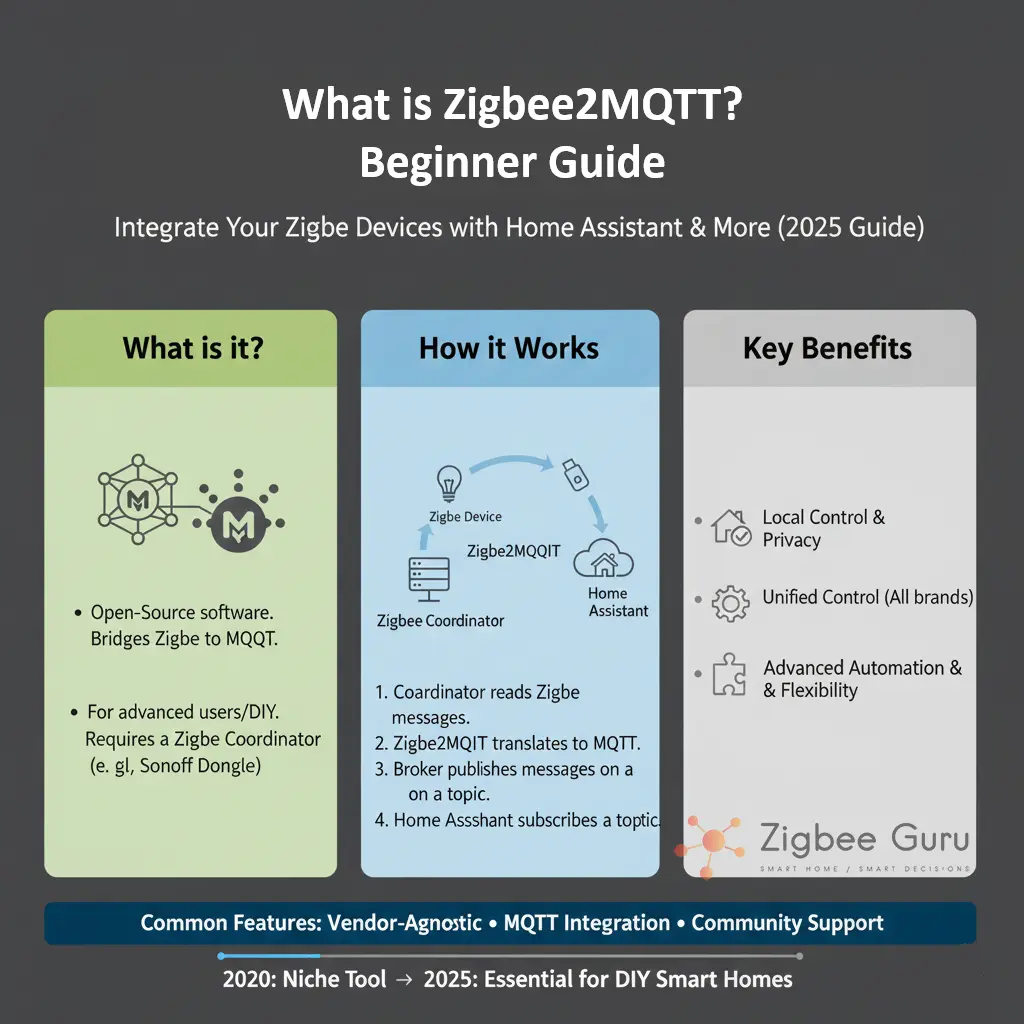
Zigbee2MQTT is an open-source bridge that connects Zigbee devices to an MQTT broker, allowing full local control without relying on cloud services or vendor-specific hubs. It provides a flexible, transparent way to manage devices using standards-based messaging.
In practical terms, it replaces proprietary Zigbee hubs with a universal coordinator and exposes every device through MQTT topics. This architecture enables advanced automation platforms—such as Home Assistant, Node-RED, and OpenHAB—to integrate Zigbee devices reliably and without lock-in.
This guide explains how Zigbee2MQTT works, what hardware it requires, how it differs from commercial hubs, and how beginners can set up a stable and scalable Zigbee network in European homes.
Table of Contents
- Overview: What Zigbee2MQTT Does
- Required Hardware and Coordinators
- System Architecture and Data Flow
- Supported Zigbee Devices
- Installation and Setup Basics
- Key Configuration Concepts
- Mesh Design and Router Placement
- Troubleshooting Common Issues
- Zigbee2MQTT vs ZHA vs Commercial Hubs
- Conclusion
Overview: What Zigbee2MQTT Does
Zigbee2MQTT acts as a translation layer between Zigbee radios and MQTT, allowing any automation system to interact with Zigbee devices using a unified messaging model. It abstracts vendor-specific behaviours and exposes devices as structured MQTT topics.
The project maintains a strong focus on local control, transparency, and interoperability. All operations—from pairing to attribute reporting—occur via your MQTT broker rather than cloud services or proprietary mobile apps. For conceptual background, see also What Is Zigbee?.
- Open-source and fully local operation
- Vendor-neutral device pairing
- Extensive logging and diagnostic tools
- Highly configurable via YAML
Required Hardware and Coordinators
Zigbee2MQTT requires a compatible coordinator adapter that acts as the root of the Zigbee network. Modern installations typically use adapters based on Texas Instruments CC2652 or Silicon Labs EFR32MG chips, supplied as USB sticks, dev boards, or PoE gateways 👉 Check Price on Amazon.
The coordinator’s firmware determines network features, routing stability, and scalability. Many adapters ship with community-maintained firmware supporting large device counts, improved throughput, and enhanced diagnostics.
- USB sticks (TI CC2652P, CC2652R, EFR32MG)
- Network-based coordinators (Ethernet/PoE bridges)
- Short USB extension cables to reduce interference
- MQTT broker (Mosquitto is the most common)
Using a high-quality coordinator and good placement practices significantly improves link quality and reduces packet loss across the mesh, especially in European buildings with reinforced concrete walls.
System Architecture and Data Flow
Zigbee2MQTT follows a modular architecture: the coordinator forms the Zigbee network, Zigbee2MQTT processes and translates incoming frames, and the MQTT broker distributes messages to clients such as Home Assistant, Node-RED, or custom applications.
This separation of roles improves reliability. If your automation platform restarts, the Zigbee network continues operating. MQTT decouples devices from the control software, enabling parallel debugging and flexible integrations.
| Component | Role | Notes |
|---|---|---|
| Coordinator | Forms Zigbee network | IEEE 802.15.4 radio at 2.4 GHz |
| Zigbee2MQTT | Translates Zigbee⇄MQTT | Runs on Linux, Windows, Docker |
| MQTT Broker | Message distribution | Mosquitto is widely used |
| Home Assistant | Automation interface | Subscribes to MQTT topics |
Supported Zigbee Devices
Zigbee2MQTT supports thousands of Zigbee devices from major vendors, including lights, plugs, sensors, switches, thermostats, and energy monitors. Compatibility is maintained by a large community that continuously tests new devices.
The project’s device database documents features, quirks, and configuration options. This helps users understand limitations and required parameters for stable operation in mixed-vendor networks.
- Sensors (contact, motion, temperature/humidity)
- Lighting products and LED controllers
- Plugs, energy meters, and smart switches
- Thermostatic and HVAC-related devices
Zigbee2MQTT frequently supports devices before some commercial hubs do, especially niche or advanced engineering-grade modules designed for custom installers.
Installation and Setup Basics
Installation consists of preparing the coordinator, deploying Zigbee2MQTT on your preferred platform, and configuring the MQTT broker. Most users run it on a Raspberry Pi, NAS, or a lightweight Linux system.
The onboarding process includes enabling permit-join mode, pairing devices, and verifying communication through MQTT topics. This ensures that data flows correctly before deeper configuration takes place.
- Flash or verify coordinator firmware
- Install Zigbee2MQTT (binary, Docker, or supervised)
- Configure MQTT authentication and topics
- Pair devices and validate topic updates
Once devices are paired, topology and signal metrics become visible, allowing you to analyse mesh strength and plan router placement more effectively.
Key Configuration Concepts
Zigbee2MQTT uses a YAML configuration file to define network parameters, device-specific behaviours, logging levels, and MQTT settings. This provides full transparency and fine-grained control compared to proprietary hubs.
Important parameters include channel selection, network security keys, MQTT base topics, and device-specific converters. Thoughtful configuration helps avoid instability caused by interference, poor routing, or excessive reporting intervals.
- Zigbee channel (avoid heavy overlap with Wi-Fi)
- Extended PAN ID and network key
- MQTT base topic structure
- Reporting intervals and attribute exposure
Zigbee2MQTT also supports OTA firmware updates for many devices, enabling bug fixes and feature improvements without replacing hardware.
Mesh Design and Router Placement
A stable Zigbee2MQTT deployment depends on a healthy mesh. Because Zigbee uses low-power IEEE 802.15.4 radios, devices rely on routers to propagate messages across the home. European homes require more routers than open-plan environments due to dense construction materials.
Router density should be planned deliberately, especially if you operate many battery sensors that depend on stable parent routers. Placing the coordinator centrally and away from Wi-Fi access points reduces packet loss and improves route consistency.
- Use one router every 6–8 m in typical EU apartments
- Avoid placing routers in metal enclosures or behind appliances
- Maintain a clear RF environment around the coordinator
- Create overlapping router coverage to avoid single points of failure
Good mesh design often eliminates intermittent device drops and reduces routing churn, improving overall automation reliability.
Troubleshooting Common Issues
The most common issues in Zigbee2MQTT deployments relate to interference, poor placement, or insufficient router density. Diagnostic logs and the Zigbee map provide clear indicators of route quality and device health.
Zigbee2MQTT offers verbose logging to identify unstable routers, repeated retries, and devices that frequently change parents. These symptoms help pinpoint physical or RF-related problems rather than software defects.
- Check Wi-Fi overlap and choose an appropriate channel
- Verify coordinator placement with a USB extension cable
- Add routers to strengthen weak areas
- Reduce excessive reporting intervals from sensors
Most reliability issues disappear once RF conditions and mesh topology are corrected. Software changes alone rarely fix physical-layer limitations.
Zigbee2MQTT vs ZHA vs Commercial Hubs
Zigbee2MQTT differs from other Zigbee control methods by offering full transparency, universal device support, and independent architecture. ZHA (Zigbee Home Automation) integrates more tightly with Home Assistant, while commercial hubs abstract most technical details.
Choosing between them depends on how much control and visibility you require. Zigbee2MQTT is ideal for users who want detailed logs, flexible configuration, and broad compatibility, while maintaining complete local autonomy.
| Feature | Zigbee2MQTT | ZHA | Commercial Hubs |
|---|---|---|---|
| Local Control | Full | Full | Varies by vendor |
| Device Support | Very broad | Broad | Moderate |
| Configuration Depth | High | Medium | Low |
| Ease of Use | Medium | High | Very high |
Conclusion
Zigbee2MQTT provides a powerful, flexible way to manage Zigbee networks entirely locally. Its transparency, configurability, and device support make it suitable for users who value control and want to avoid proprietary ecosystems.
With proper coordinator placement, solid router density, and careful channel planning, Zigbee2MQTT delivers stable operation across a wide range of devices. Its MQTT-based architecture ensures long-term adaptability to different automation platforms and evolving standards.
FAQ: Zigbee2MQTT Beginner Guide
- Q: Do I need Home Assistant to use Zigbee2MQTT?
A: No. Zigbee2MQTT operates independently and only requires an MQTT broker. Home Assistant is optional and acts as an interface consuming MQTT topics. - Q: Can I mix devices from different brands?
A: Yes. Zigbee2MQTT is vendor-neutral and supports devices from many manufacturers as long as they comply with Zigbee profiles. - Q: Is Zigbee2MQTT difficult for beginners?
A: The initial setup requires basic familiarity with configuration files and MQTT, but once running, device management is straightforward. - Q: Does Zigbee2MQTT support OTA updates?
A: Many devices support OTA firmware updates through Zigbee2MQTT, depending on manufacturer compatibility. - Q: Can I migrate from a commercial hub?
A: Migration is possible but requires re-pairing devices because Zigbee networks cannot transfer keys between coordinators. - Q: Does Zigbee2MQTT work with Thread or Matter?
A: No. Zigbee2MQTT is strictly for Zigbee. Thread and Matter require different radios and protocols based on IPv6.



