
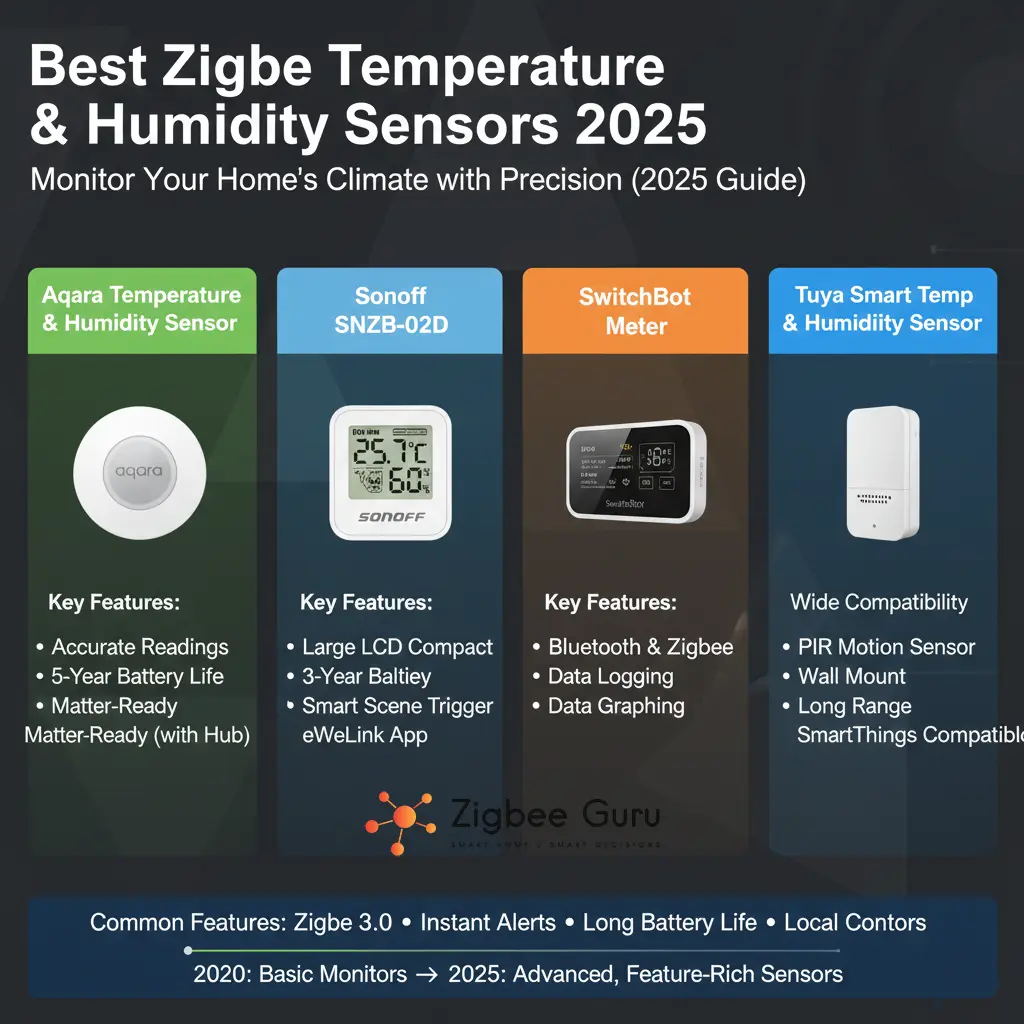
Accurate temperature and humidity data is the backbone of any serious smart home. From protecting wooden floors and musical instruments to optimizing heating, cooling, and dehumidifiers, Zigbee temperature & humidity sensors are the quiet workers that keep everything stable in the background.
The challenge in 2026 is not “can I find a sensor?” but rather which one should I trust for battery life, accuracy, and reliable Zigbee 3.0 performance in a European home. In this guide, we focus on the best Zigbee temperature & humidity sensors available today, how to choose between Aqara, SONOFF, Tuya and others, and how to place them for dependable readings.
If you are new to Zigbee in general, you may want to start with our main guide: What is Zigbee? A Complete Guide (2026 updated)
Table of Contents
- Why Zigbee Temperature & Humidity Sensors Matter
- Best Overall: SONOFF SNZB-02P
- Best for Aqara & Apple Home: Aqara Temperature & Humidity Sensor
- Best Budget: Tuya/Smart Life Zigbee Sensors
- Best for Harsh Environments: IP65 Zigbee Sensors
- Quick Comparison Table
- Placement & Mesh Design Tips
- Conclusion
- FAQ
Why Zigbee Temperature & Humidity Sensors Matter
A Zigbee temperature & humidity sensor continuously measures the climate in a room and reports values to your smart home hub. Automations can then adjust radiators, AC units, dehumidifiers, fans, or even window blinds based on real data instead of static schedules. Modern Zigbee 3.0 sensors typically offer ±0.3–0.5 °C temperature accuracy, ±3–5% RH humidity accuracy and multi-year battery life, while using very little bandwidth on your network.
Because Zigbee is designed for low-power mesh networking, these sensors are ideal for locations where Wi-Fi would be wasteful or unreliable: inside cabinets, in attics, near windows, in basements or on balconies. They report small packets over 2.4 GHz using IEEE 802.15.4, allowing dozens of sensors to coexist without congesting your Wi-Fi.
When choosing the “best” sensor, you should consider four factors: ecosystem compatibility (Aqara, Tuya, SONOFF, Hue, etc.), accuracy & update interval, battery chemistry & life, and placement conditions (indoor vs semi-outdoor, IP rating, mounting).
- Ecosystem: Works smoothly with your existing hub (e.g. Home Assistant, Aqara Hub, Tuya/Smart Life, SmartThings).
- Accuracy & Refresh: Look for ±0.2–0.5 °C, ±2–5% RH, and at least periodic updates (e.g. every 5–60 seconds or when values change).
- Battery Type: CR2032/CR2477 coin cells vs AAA—coin cells are compact, AAA are easier to replace.
- Environment: Normal indoor vs damp, dusty or exterior locations (where an IP-rated sensor is better).
Best Overall: SONOFF SNZB-02P
The SONOFF SNZB-02P is one of the strongest all-round Zigbee temperature & humidity sensors for 2026, especially for Home Assistant users and tinkerers who prefer an open, standards-based device. It is a Zigbee 3.0 sensor built around a modern SoC and a high-precision Swiss-made sensing element. 👉 Check Price on Amazon
- High accuracy & fast refresh: Typical specs are around ±0.2 °C for temperature and ±2% RH for humidity, with readings updated roughly every 5 seconds—excellent for fine-tuned HVAC automations.
- Zigbee 3.0 compatibility: Works with SONOFF’s own hubs (iHost, NSPanel Pro, ZB Bridge Pro, dongles) and many third-party Zigbee 3.0 hubs (Echo 4th Gen, SmartThings, etc.).
- Battery life: Powered by a CR2477 cell with quoted life up to several years under typical use, thanks to low-power design and compact payloads.
- Data history: When used with compatible apps, you can often see temperature/humidity graphs over months and export logs for analysis and energy optimization.
Best for: users with Home Assistant or other advanced hubs, who want fast updates, high accuracy and broad Zigbee 3.0 compatibility without being locked into one vendor’s closed ecosystem.
Watch out for: as with all coin-cell devices, extremely cold locations or constant rapid polling can reduce battery life; let the Zigbee network handle its normal reporting interval rather than forcing frequent manual refreshes.
Best for Aqara & Apple Home: Aqara Temperature & Humidity Sensor
The classic Aqara Temperature & Humidity Sensor (model WSDCGQ11LM) remains a reference choice in 2026 for users who prefer the Aqara ecosystem or want deep integration with Apple Home. It is small, aesthetically minimal, and uses Zigbee to talk to an Aqara hub. 👉 Check Price on Amazon
- Accurate environmental sensing: Typical temperature range is around −20 °C to +50 °C with ±0.3 °C accuracy, and humidity 0–100 % RH with ±3 % accuracy—well within the needs of residential automation.
- Pressure sensor included: Unlike many competitors, Aqara’s sensor also measures atmospheric pressure, which is useful for more advanced automations or dashboards.
- CR2032 battery & long life: The compact coin-cell battery keeps the device tiny and typically lasts many months to years under normal conditions.
- Ecosystem strength: Pairs smoothly with Aqara Hubs and the Aqara Home app, and can be exposed to Apple Home via supported bridges.
Best for: homes already invested in Aqara sensors and switches, or Apple-centric households that want everything to appear nicely inside the Home app with minimal configuration.
Considerations: you are largely tied to Aqara hubs (or compatible bridges) for commissioning, and while integration with other systems is possible, the most polished experience is inside Aqara’s own ecosystem.
Best Budget: Tuya/Smart Life Zigbee Sensors
The Tuya/Smart Life universe includes many OEM Zigbee temperature & humidity sensors sold under different brand names (MOES, BSEED, no-name rebrands, etc.). Internally, they often share similar modules and specifications: Zigbee 3.0 at 2.4 GHz, ±0.5 °C temperature accuracy, ±5 % humidity accuracy, and CR2032 or AAA power. 👉 Check Price on Amazon
- Very affordable: usually the lowest price per sensor, making them ideal for broad coverage (hallways, bedrooms, storage rooms).
- Direct Tuya/Smart Life app control: easy setup via the Tuya or Smart Life app, with built-in charts, thresholds and notifications.
- Voice assistant support: many Tuya Zigbee T&H sensors work with Alexa and Google Assistant via the gateway, so you can ask for room conditions by voice.
- Variety of designs: from minimal round pucks to wall-mounted units with LCD screens and even audible alarms.
Best for: users already running a Tuya Zigbee gateway or a multi-protocol hub that understands Tuya Zigbee devices, and who want to cover many rooms without overspending.
Watch out for: quality can vary between specific OEM models; always check user feedback in your region and verify that the exact model you choose is recognized correctly by your hub (e.g. Home Assistant, Zigbee2MQTT, ZHA).
Best for Harsh Environments: IP65 Zigbee Sensors
For locations like balconies, unheated storage, basements, greenhouses or even sheltered outdoor spots, a normal indoor sensor may not survive humidity, dust or condensation. In these cases, an IP-rated Zigbee 3.0 temperature & humidity sensor is a better fit. 👉 Check Price on Amazon
- Higher protection: IP65-class devices are designed to resist dust and water jets, making them more tolerant of damp or dirty environments.
- Wide range: some models specify operating ranges around −20 °C to +55 °C and 0–99 % RH, which is suitable for fridge monitoring, sheds and semi-outdoor spaces.
- Tuya-based options: many IP-rated sensors use Tuya Zigbee 3.0 modules and integrate with Tuya/Smart Life, Alexa and Google Assistant via a gateway.
Best for: homeowners who need to monitor sensitive areas (wine storage, server cabinets, cold rooms, greenhouses) where moisture or dust could damage non-sealed devices.
Note: any IP-rated sensor still needs proper placement—avoid direct standing water or full outdoor exposure unless the manufacturer explicitly supports it.
Quick Comparison Table
If you just want the “at a glance” differences between the main categories discussed above, this table summarizes the most important aspects.
| Aspect | SONOFF SNZB-02P | Aqara T&H Sensor | Tuya/Smart Life Zigbee | IP65 Zigbee Sensor |
|---|---|---|---|---|
| Typical Use | General & advanced automations; prosumer hubs | Apple/Aqara-centric homes | Budget-friendly whole-home coverage | Harsh / semi-outdoor environments |
| Accuracy | ≈ ±0.2 °C / ±2 % RH (typical) | ≈ ±0.3 °C / ±3 % RH | ≈ ±0.5 °C / ±5 % RH | ≈ ±0.5–0.6 °C / ±5–6 % RH |
| Battery Type | CR2477 coin cell | CR2032 coin cell | CR2032 or 2×AAA (varies) | Usually 2×AAA |
| Network | Zigbee 3.0, wide hub support | Zigbee via Aqara hubs | Zigbee 3.0 via Tuya gateways | Zigbee 3.0 via Tuya gateways |
| Best Strength | Fast refresh, high precision | Design & ecosystem polish | Cost & availability | Protection & range of conditions |
Placement & Mesh Design Tips
Even the best sensor will report “bad” data if installed in the wrong place or on a weak Zigbee mesh. A few simple rules can dramatically improve accuracy and reliability.
- Avoid direct sun, radiators and windows: place the sensor at about 1.2–1.5 m height on an interior wall, away from direct sunlight, heaters or drafts for a more realistic room temperature.
- Strengthen the Zigbee mesh: distribute a few Zigbee routers (smart plugs, in-wall relays, etc.) so that every sensor has at least one good-quality path (high LQI) back to the coordinator.
- Use one sensor per “thermal zone”: open-plan spaces may only need one sensor; multi-room apartments often benefit from 3–5 sensors to capture real variations.
- Allow time for stabilization: after relocating or installing a sensor, give it 30–60 minutes before judging the readings; plastics, walls and internal components need time to equilibrate.
- Check logs, not single readings: use your hub’s history graphs to evaluate comfort trends and detect issues like overshooting heating curves or humidity spikes at specific times.
Key Takeaway: choose the sensor family based on your ecosystem first, but never neglect placement and mesh design—those two factors have more impact on real-world performance than the last 0.1 °C of accuracy.
Conclusion
In 2026, Zigbee temperature & humidity sensors are mature, inexpensive and technically solid. The right choice for you depends less on raw specifications and more on which ecosystem you already run and where the sensor will live in your home.
For most EU homes with multi-platform hubs, a SONOFF SNZB-02P-style sensor is an excellent default: accurate, fast and broadly compatible. Aqara’s sensor is a great fit for Apple and Aqara-centric setups, while Tuya/Smart Life-based sensors shine when you need many cheap units. For basements, storage and balconies, an IP65-rated Zigbee sensor gives you extra safety margin.
Combine these sensors with a strong Zigbee mesh and good placement, and your smart home can finally treat temperature and humidity not as guesses, but as reliable engineering inputs for comfort and energy efficiency.
FAQ
Here are answers to common questions people ask before investing in Zigbee temperature & humidity sensors for their home.
- How many temperature & humidity sensors do I need in a typical apartment?
For an EU apartment up to ~120 m², 3–5 sensors is a good starting point: one in the main living area, one in the primary bedroom, one in the hallway, and optionally one in any problem room (very humid, very hot or very cold). - Can I mix brands (e.g., SONOFF, Aqara, Tuya) on the same Zigbee network?
Yes, as long as your coordinator and software (e.g., Home Assistant, Zigbee2MQTT, ZHA, SmartThings) support those devices. Mixing brands is common; just ensure all are Zigbee-certified and ideally Zigbee 3.0. - Are Zigbee temperature sensors more reliable than Wi-Fi sensors?
For low-bandwidth measurements like temperature and humidity, Zigbee is usually more power-efficient and scales better when you have many devices. Wi-Fi sensors are fine for a few locations, but dozens of Wi-Fi devices may overload low-end routers. - How often should a good sensor update its readings?
There is no universal standard, but many high-quality Zigbee sensors report changes every few seconds when values are moving, and at least once per 30–60 minutes when stable. This balance preserves battery life while keeping automations responsive. - Do I need a special hub for temperature & humidity sensors?
You need a Zigbee coordinator or hub that supports the brand you choose (Aqara Hub, Tuya Zigbee gateway, SONOFF hub, or a USB coordinator with Home Assistant). The same hub can usually handle your lights, plugs, sensors and other Zigbee devices together.



