
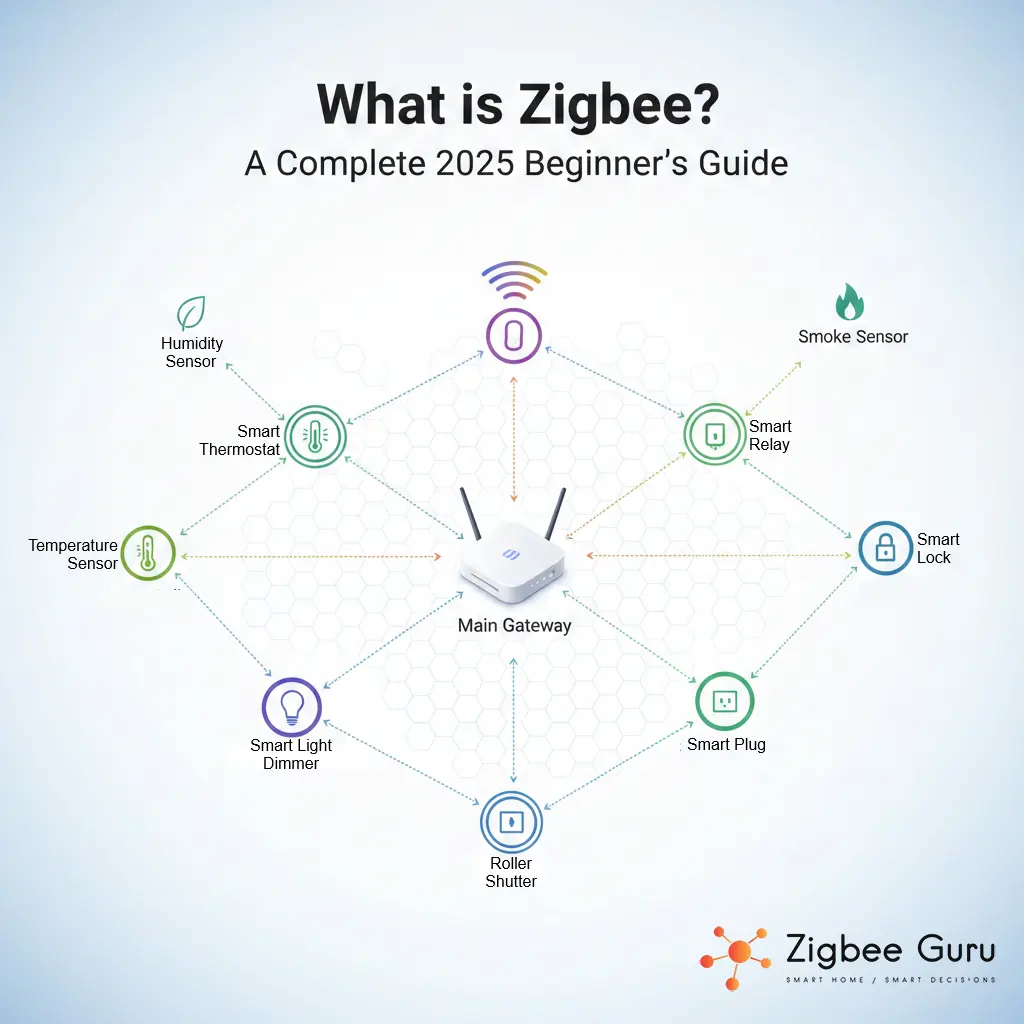
Zigbee is a low-power wireless protocol built for what smart homes actually need most: sensors, switches, relays, thermostats, TRVs, and lighting that must stay reliable even when Wi-Fi gets crowded. It is not “faster Wi-Fi” and it is not an internet protocol. It is a purpose-built automation network designed for small messages, long battery life, and resilient indoor coverage.
This guide explains Zigbee from an engineering + EU deployment angle: how the stack works, the three device roles, what Zigbee 3.0 changes, how to plan channels in apartment RF chaos, how to avoid common failure modes that cause dropouts, and how Zigbee fits next to Thread and Matter over the next few years.
Quick next steps: If you’re deciding what to buy, jump to the curated overview: future-proof Zigbee hubs for EU homes.
Table of Contents
- What Is Zigbee? (Definition + What It’s For)
- Zigbee in the Protocol Stack (IEEE 802.15.4, non-IP mesh)
- How Zigbee Works: Mesh + Device Roles
- Scaling Reality: What Limits a Zigbee Network
- Zigbee 3.0 + Interoperability (What “Compatible” Really Means)
- Security Basics: Network Key, Link Keys, Trust Center
- EU RF Planning: Channels, Wi-Fi Coexistence, LQI/RSSI
- Stability Rules That Actually Prevent Dropouts
- Choose Your Stack + Coordinator (Decision Logic)
- Zigbee vs Wi-Fi vs Z-Wave vs Thread (When Each Wins)
- Is Zigbee Future-Proof Next to Matter/Thread?
- Conclusion
- FAQ
What Is Zigbee? (Definition + What It’s For)
Zigbee is a low-power wireless protocol used primarily for automation devices: battery sensors (motion, door/window, temperature), switches, smart plugs, dimmers, relays, radiator valves (TRVs), and many HVAC/energy peripherals. Zigbee is optimized for small, infrequent packets (a sensor value, a button press, an on/off command), not high throughput.
In practical EU homes, Zigbee is usually deployed as a local automation fabric: the mesh keeps operating inside the home as long as your coordinator and your automation platform are local and correctly configured. This is why Zigbee remains popular for reliability-focused setups (especially Home Assistant and advanced DIY). For the wider decision, see when to run automations locally and when the cloud is good enough.
If you want the “why Zigbee” answer in one line: Zigbee is infrastructure. Treat it like a fixed building system (placement, backbone, channel plan) and reliability becomes boring—in the best possible way.
Zigbee in the Protocol Stack (IEEE 802.15.4, non-IP mesh)
Zigbee is built on IEEE 802.15.4 at the radio/PHY layer. Most consumer Zigbee smart home devices use 2.4 GHz worldwide (channels 11–26). Above the radio layer, Zigbee adds its own network layer (mesh routing), and an application layer (clusters/attributes that represent device capabilities).
Key point: Zigbee is generally a non-IP mesh. That’s one reason it can be efficient and battery-friendly, but it also means it needs a coordinator to form and manage the network, and it relies on coordinator software for integration with platforms like Home Assistant.
How Zigbee Works: Mesh + Device Roles
Zigbee forms a self-healing mesh: devices can relay messages through other devices to reach the coordinator. This differs from a typical Wi-Fi topology where devices talk directly to one access point/router. In a Zigbee network, powered devices are usually what makes the mesh strong.
The Three Essential Roles in Every Zigbee Network
- Coordinator: the network “owner”. It forms the network, stores keys, controls joining, and is the integration point to your platform (for example, Home Assistant).
- Router: a powered device that keeps its radio active and forwards traffic (smart plug, mains-powered relay, many bulbs, dedicated repeaters). Router quality and firmware stability matter more than most people think.
- End Device: typically battery-powered sensors. They sleep aggressively to save power, attach to a parent (router or coordinator), and do not relay traffic.
Deployment reality: A Zigbee network that looks fine at 10 devices can become unstable at 50+ if you add sleepy sensors first and only later try to “patch” coverage. The stable rollout order is: coordinator + channel plan → router backbone → endpoints.
Scaling Reality: What Limits a Zigbee Network
Forget theoretical maximums. In real homes, Zigbee scaling is limited by:
- Coordinator firmware + stability: some stacks handle re-joins, device quirks, and network maintenance better than others.
- Router behavior: routers have finite child capacity and vendor-specific bugs. A “bad router” can poison the whole mesh.
- RF conditions: apartment Wi-Fi congestion, concrete/rebar walls, metal enclosures, and noise sources (including USB 3.0).
- Commissioning discipline: changing channels after pairing, moving the coordinator, or mixing unstable router devices tends to create chaos.
In well-designed homes with a planned router backbone, triple-digit device counts are realistic, but only if you treat routing and placement as infrastructure. If you’re building toward a large deployment, also plan backups and recovery (coordinator firmware updates, database backups, documented settings).
Zigbee 3.0 + Interoperability (What “Compatible” Really Means)
Zigbee 3.0 unified older application profiles into a single modern baseline intended to improve interoperability. In practice, “Zigbee 3.0” is a strong positive signal, but it does not guarantee perfect compatibility across every ecosystem.
Why? Vendors frequently implement:
- Custom clusters/attributes for extra features (battery reporting, calibration, special modes).
- Non-standard behaviors around reporting intervals, rejoin logic, or firmware updates.
- Router-specific quirks that matter at scale (child limits, memory leaks, route maintenance).
Engineering takeaway: use known-stable routing devices (plugs/relays/repeaters) and treat experimental devices as endpoints until proven stable. If you want a curated hub overview, use: future-proof Zigbee hubs for EU homes.
Security Basics: Network Key, Link Keys, Trust Center
Zigbee security usually revolves around a network key used to encrypt traffic on the network. Some devices also use link keys for device-specific security during joining and key transport. The coordinator often acts as the trust center: it controls joining policy and how keys are distributed.
Practical security rules that matter in real homes:
- Keep your coordinator platform updated, but avoid “blind updates” right before a critical period. Change management matters.
- Do not leave joining open permanently. Pair intentionally, then lock joining down.
- Back up coordinator data (and your automation platform) if your stack supports it. Recovery planning is part of reliability.
EU RF Planning: Channels, Wi-Fi Coexistence, LQI/RSSI
Most Zigbee smart home networks run on 2.4 GHz channels 11–26. Wi-Fi 2.4 GHz typically uses channels centered around 1 / 6 / 11, and modern routers can use 20 MHz or 40 MHz widths. Wider Wi-Fi means more overlap, which can reduce Zigbee reliability.
Two metrics matter in troubleshooting:
- LQI (Link Quality Indicator): often shown as 0–255. Higher is generally better, but the mapping is vendor-specific.
- RSSI (dBm): signal strength. Closer to 0 is stronger; around –80 dBm or worse often becomes unreliable through dense walls.
Coexistence is mostly engineering hygiene: choose channels before pairing, keep the coordinator away from Wi-Fi access points, and move heavy clients (phones/laptops/TVs) to 5 GHz/6 GHz where possible. For a practical dropout troubleshooting path, see: why Zigbee devices lose connection.
| What you control | What it affects | Practical rule |
|---|---|---|
| Wi-Fi 2.4 GHz channel + width | Overlap and airtime competition | Prefer 20 MHz in apartments; avoid 40 MHz if Zigbee is critical |
| Zigbee channel (11–26) | Collision probability with Wi-Fi/Bluetooth | Pick once before pairing; change later only if you accept re-commissioning costs |
| Coordinator placement | Noise floor, multipath, weak first hop | Use a USB extension cable; avoid APs, metal boxes, and USB 3.0 noise sources |
| Metric | What it means | How to use it |
|---|---|---|
| LQI | Link quality indicator (often 0–255) | Use it to find weak hops; compare within your own system (vendor-specific) |
| RSSI (dBm) | Signal strength | Very low values correlate with retries and latency; concrete walls can be brutal |
| Retries | Re-transmissions due to errors | Retries increase latency and battery drain; fix RF or routing, not just “re-pair” |
Quick EU channel cheat sheet (from real apartment deployments):
| Wi-Fi 2.4 GHz setting | Typical impact | Common Zigbee channel strategy |
|---|---|---|
| Wi-Fi channel 1 (20 MHz) | Lower overlap with higher Zigbee channels | Prefer Zigbee around 20 or 25 |
| Wi-Fi channel 6 (20 MHz) | Mid-band congestion common in apartments | Prefer Zigbee around 15, 20, or 25 (test) |
| Wi-Fi channel 11 (20 MHz) | Upper-band overlap risk | Prefer Zigbee around 15 or 20 |
Stability Rules That Actually Prevent Dropouts
If you only remember five rules, remember these:
- Plan first: set Wi-Fi 2.4 GHz channels and pick a Zigbee channel before pairing devices.
- Backbone first: deploy enough powered routers before adding many sleepy sensors.
- Placement matters: keep the coordinator away from Wi-Fi APs, metal enclosures, and USB 3.0 ports; use a short USB extension cable.
- Do not promote unknown routers: some bulbs/plugs are weak routers. If a device is flaky, keep it from being a critical relay.
- Use diagnostics: fix weak hops with router placement and RF changes instead of random re-pairing.
When range and coverage are the problem, the fix is rarely “buy a stronger hub.” The fix is usually router density and placement. Start here: Zigbee range problems (easy solutions).
Zigbee behaves like infrastructure: if you treat the coordinator and routers as fixed building systems, reliability becomes predictable.
Choose Your Stack + Coordinator (Decision Logic)
This is the decision that determines your long-term experience: how you run Zigbee. Most advanced EU users fall into one of these paths:
A) Home Assistant / DIY (Maximum control)
If you want deep diagnostics, local reliability, and the ability to mix vendors freely, Home Assistant is the common choice. You typically run Zigbee via ZHA or Zigbee2MQTT (both can be excellent). Your coordinator choice matters here more than in closed ecosystems.
ZHA vs Zigbee2MQTT (Quick engineering trade-offs)
| Topic | ZHA | Zigbee2MQTT |
|---|---|---|
| Setup complexity | Typically simpler (native HA integration) | More moving parts (MQTT), more tuning options |
| Device quirks support | Good, improving | Often very strong for diverse devices |
| Debug/visibility | Good | Often excellent (depending on tooling) |
| Who chooses it | Advanced DIY who want stability and simplicity | Power users who want maximum compatibility and control |
More info at What is Zigbee2MQTT? Beginner Guide
B) Vendor Hub + Bridge (Lower risk, fewer knobs)
If you prefer a “works with minimal maintenance” approach, a vendor hub can be a good path, especially if it can expose devices to modern ecosystems through a bridge. The trade-off is reduced flexibility and sometimes slower access to advanced attributes and diagnostics.
Coordinator recommendations (EU-focused, criteria-based)
Pick based on placement, firmware maturity, ecosystem fit, and diagnostics. “Max power” marketing is not the same thing as stability.
- 1) Ethernet/PoE placement advantage (best for tricky homes): if you need to place the radio in the best RF spot (central hallway, away from the router), Ethernet-based coordinators can be the cleanest engineering solution.
SMLight SLZB-06M (high power + flexible placement). 👉 Check price on Amazon
- 2) Official Home Assistant hardware (simple + supported): strong option if you want an official device and straightforward integration.
Home Assistant SkyConnect / ZBT-2 (often also used for Matter/Thread depending on setup). 👉 Check price on Amazon
- 3) Bridge-first ecosystem (if you want Matter ecosystem exposure): useful when you accept a vendor hub but want the bridge role into modern controllers.
Aqara Hub M3 (Zigbee bridge + Matter controller features depending on ecosystem design). 👉 Check price on Amazon or check the full review of Aqara Hub M3
Budget note: if you are choosing budget hubs mainly for availability/price, be realistic about diagnostics and long-term maintainability. See the broader hub landscape here: best Zigbee hubs for EU homes. Also check Cheapest Zigbee Devices that actually work
Affiliate disclosure: Some links may be affiliate links. It does not change the price you pay, and it supports ZigbeeGuru’s engineering-first work.
Zigbee vs Wi-Fi vs Z-Wave vs Thread (When Each Wins)
The mistake is to ask “which is best” in general. The correct question is “which is best for this device role in this RF environment.”
| Technology | Best for | Where it struggles |
|---|---|---|
| Zigbee | Sensors, lighting, relays, TRVs, dense automation, battery (low energy) devices | 2.4 GHz congestion if channels/placement are ignored |
| Wi-Fi | Cameras, streaming, high bandwidth devices | Too many devices, airtime congestion, power usage for sensors |
| Z-Wave (EU) | Automation devices needing better wall penetration in some buildings | Smaller ecosystem, device cost often higher |
| Thread | IP mesh foundation for Matter (newer ecosystems) | Still growing device diversity; requires border router planning |
For deeper comparisons, see: Zigbee vs Wi-Fi smart devices and Zigbee vs Z-Wave. For the “big picture” choice between Zigbee, Thread, and Matter roles, use: Zigbee vs Thread vs Matter (engineering perspective).
Is Zigbee Future-Proof Next to Matter/Thread?
People ask: Will Matter kill Zigbee?
Answer: No, but it changes how Zigbee 3.0 is presented to ecosystems.
Matter is an application-layer standard over IP transports (Wi-Fi, Ethernet, Thread). Zigbee remains a massive installed base for low-cost sensors and reliable automation peripherals. In real deployments, Zigbee often continues to do the sensor/automation work, while Matter becomes the unifying “front door” through bridges and gateways (for example, vendor hubs exposing Zigbee devices to Matter controllers).
Clean mental model: Thread is where new IP-native low-power devices grow, and Zigbee remains the mature workhorse for affordable sensors and dense automation—especially in EU homes where reliability and local control matter.
Conclusion
Zigbee remains one of the best engineering choices for a stable, local-first, energy-efficient smart home—especially for sensors, lighting, and automation peripherals. The protocol is mature, the ecosystem is huge, and reliability is excellent when you treat the network like infrastructure: plan channels, build a router backbone, place the coordinator correctly, and use diagnostics instead of guesswork.
If you’re deciding what to buy next, start with the coordinator + stack decision, then design the backbone before you scale endpoints. If the budget is the constraint, we cost out a complete Zigbee starter home for under €100. Most “Zigbee problems” are not Zigbee problems—they are deployment problems.
FAQ
- Does Zigbee interfere with Wi-Fi?
It can. Both use 2.4 GHz, so poor channel planning and close physical placement can increase retries, latency, and dropouts. Use 20 MHz Wi-Fi where possible, pick a Zigbee channel before pairing, and keep the coordinator away from the Wi-Fi access point. - How many Zigbee devices can one network handle in practice?
Theoretical addressing is large, but practical capacity depends on coordinator firmware, router child limits, device quality, and RF conditions. With a planned router backbone and stable devices, large networks are realistic, but scaling requires discipline (placement, channel plan, backups). - What is a good LQI or RSSI value?
LQI is often shown as 0–255 and higher is generally better, but mapping is vendor-specific. RSSI is in dBm; values around –80 dBm or worse often become unreliable, especially through concrete/rebar walls typical in EU apartments. - What is the difference between Zigbee and Thread?
Both use IEEE 802.15.4 radios, but Thread is IPv6-based (6LoWPAN) and is designed to carry Matter traffic over IP. Zigbee is generally a non-IP mesh with its own network and application layers. - Will Matter replace Zigbee?
Matter does not speak Zigbee directly. Zigbee devices typically remain usable via bridges and gateways that translate Zigbee device models into Matter-compatible representations. - What should I do first when building a Zigbee network?
Choose the coordinator and platform, plan your 2.4 GHz channels, place the coordinator correctly, build router density first, then pair battery endpoints and validate using LQI/RSSI and network maps.
“`



